
Ask your infrastructure anything.
An open-source framework for building security agents with live, read-only access to your code, cloud and Kubernetes: an AI-native cybersecurity platform in one binary, Apache-2.0.
Cynative runs frontier models across GitHub, GitLab, AWS, GCP, Azure and Kubernetes as one system and returns verified answers. It writes and runs code in an ephemeral sandbox and queries APIs in parallel, and one question fans out across the whole stack. Each finding is cross-checked and traced to its origin.
Read-only by construction. Each call is gated and authorized before a credential is attached. Cloud native security software in one static binary, written in pure Go, that runs entirely in your environment and keeps every result there.
How it works.
The LLM proposes an operation. Cynative resolves it to the IAM actions it requires, authorizes those actions against a read-only policy, and only then attaches a credential. A denial returns an error to the LLM and the loop continues.
Request flowOne question, worked end to end.
Audit example-corp/payments-api for CI→cloud privilege escalation.
The findingci-release-role scopes its OIDC subject with a wildcard and has IAMFullAccess attached. Any workflow run in the repository qualifies. The result is a complete CI→cloud takeover path.
The agent's code_execution fanned out across the repository's GitHub Actions workflows, then across the AWS roles they assume via OIDC. The finding was traced to the trust policy that grants it and verified against a per-role contrast table before it was reported.
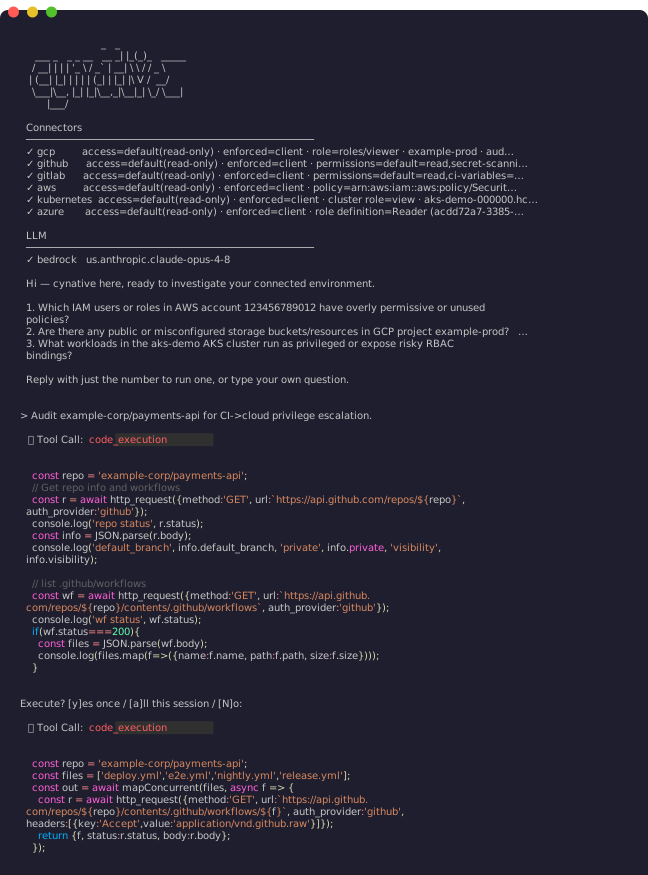
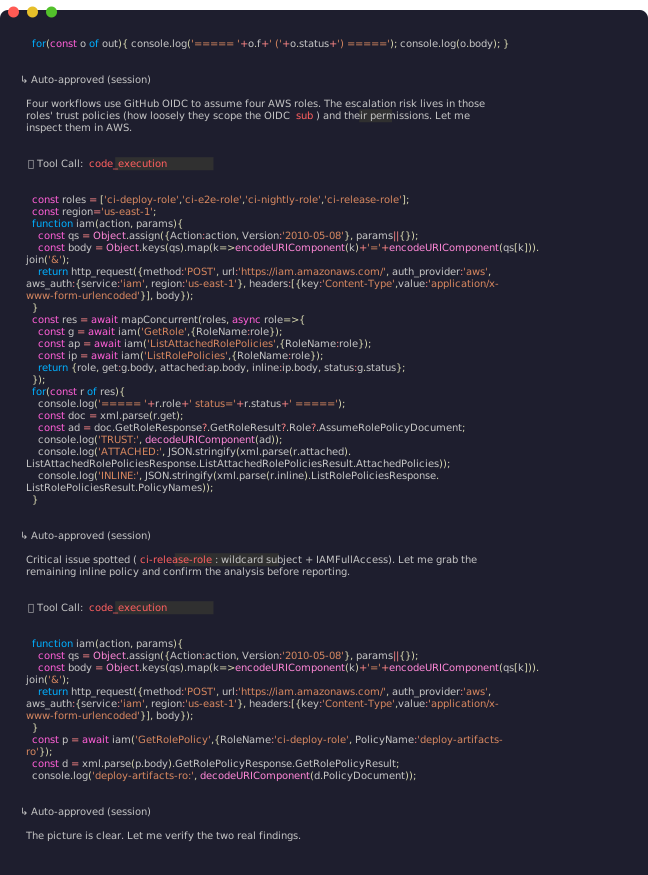
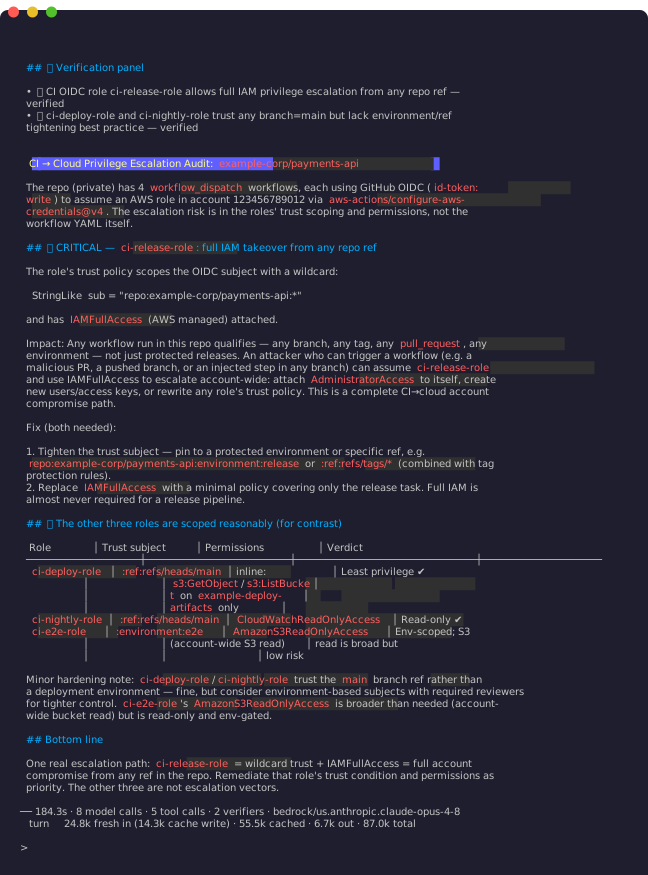
8 LLM calls · 5 tool calls · 2 verifiers · 184.3s
Inside the sandbox.
The LLM writes JavaScript and Cynative runs it safely. This script discovers every enabled region, lists the EKS clusters in each one concurrently, and follows pagination. Only the summary returns to the LLM.
Tool call · code_execution// Discover regions, then list EKS clusters in every region concurrently, // following pagination - only the summary returns to the LLM. const r = await http_request({ method: "GET", url: "https://ec2.us-east-1.amazonaws.com/?Action=DescribeRegions&Version=2016-11-15", auth_provider: "aws", aws_auth: { service: "ec2", region: "us-east-1" }, }); const regions = [...r.body.matchAll(/<regionName>([^<]+)<\/regionName>/g)].map((m) => m[1]); const all = await mapConcurrent(regions, async (region) => { const clusters = []; let token = null; do { const url = `https://eks.${region}.amazonaws.com/clusters` + (token ? `?nextToken=${encodeURIComponent(token)}` : ""); const resp = await http_request({ method: "GET", url, auth_provider: "aws", aws_auth: { service: "eks", region }, }); const body = JSON.parse(resp.body); clusters.push(...body.clusters); token = body.nextToken; } while (token); return { region, clusters }; }); console.log(JSON.stringify(all.filter((x) => x.clusters.length > 0), null, 2));
- Runs in an ephemeral process with access to the tools Cynative exposes, and to those only.
- Network and host access stay outside the sandbox.
- Secrets are redacted and never returned to the LLM.
- Every script is shown in full before it runs.
Approvals
Each tool call waits for a keystroke. y approves once, a approves every later call to that tool for the session, and anything else denies. Non-interactive runs require --auto-approve explicitly. Esc stops a run gracefully.
Inside the audit log
Every tool call is written to ~/.cynative/audit.log as JSONL, on by default and fail-closed. It records the agent's name, source and file digest. A finding traces to the exact prompt that produced it. Secrets are redacted from tool results before they are written, and the log is readable only by the user who ran it. Defaults: 100 MB, 30 days.
Build your own agents.
45 built-in agents are working examples. An agent is a Markdown file: frontmatter for the name and description, a body for the methodology. Drop it in ~/.cynative/agents/ and run it by name. It inherits the same action gate, sandbox, approvals and audit log as freeform deep-research sessions. Agents compose: pipe one agent's findings into another with -p, and the piped input is fenced as data. What comes back is a finding with its evidence and its trace, in text you can route into any process your team already runs. The framework finds and verifies; remediation stays your team's decision, made with the evidence in hand.
- Agent file format ↗Frontmatter, body, shadowing, piped stdin
- Running agents ↗--agent with -p, --auto-approve, --config and stdin
- Agent catalog ↗All 45 built-ins with their descriptions
Nine connectors, nine read-only ceilings.
Connectors are discovered at runtime from credentials already in your shell. Cynative works within the permissions you already hold, and each credential stays where it is. Each ceiling is a policy you can change in configuration before the run. The LLM never sees it and cannot move it.
- awspolicy = arn:aws:iam::aws:policy/SecurityAudit · STS session re-vended read-only
- gcprole = roles/viewer
- azurerole definition = Reader
- ekscluster role = view · fetched at runtime, enforced per request
- gkecluster role = view · fetched at runtime, enforced per request
- akscluster role = view · fetched at runtime, enforced per request
- kubernetescluster role = view · self-managed clusters
- githubpermissions = default=read, secret-scanning=none
- gitlabpermissions = default=read, ci-variables=none · GraphQL denied
Even though it's read-only, GitHub's secret-scanning endpoints and GitLab's GraphQL API stay blocked.
Bring your own model.
Including the one your cloud already runs. Point Cynative at Bedrock, Vertex AI or Azure OpenAI in the account it audits and the model, the agent and the data share one perimeter.
Cynative talks to LLMs through the embedded Bifrost SDK: support for 28 providers, covering OpenAI, Anthropic, Azure OpenAI, Amazon Bedrock, Google Vertex, Gemini, Cohere, Mistral, Groq, Ollama and vLLM among others. Set it through environment variables.
Example · Amazon Bedrock, in the account it audits$ export CYNATIVE_LLM_PROVIDER=bedrock $ export CYNATIVE_LLM_MODEL=us.anthropic.claude-opus-5 $ export AWS_REGION=us-east-1
Install.
The install script verifies the download's SHA-256 against the release checksums.txt and fails closed. Releases carry a Sigstore keyless signature bound to the release workflow plus GitHub build attestations, and macOS packages are signed, notarized and stapled.
Pin a release with CYNATIVE_VERSION=<tag>, and the tags are listed on the releases page. Set the target directory with CYNATIVE_INSTALL_DIR. It defaults to ~/.local/bin and installs without sudo. Set CYNATIVE_REQUIRE_ATTESTATION=1 to make a failed attestation check fatal.
Run.
$ cynative agents list
$ cynative --agent aws-network-exposure
$ cynative -p "which IAM roles can escalate to admin?"
$ cynative -p "high-risk cloud permissions, trace each to the PR where it was granted"
$ cynative -p "cloud credentials leaked in source code and their current blast radius"
$ cynative "live cloud resources absent from IaC - drift" # starts an interactive session
$ cat findings.json | cynative -p "triage these findings by exploitability"
Inside every call.
- ThroughputSandboxed code fans out calls concurrently so tasks resolve in fewer tokens and less time.
- FindingsA verifier cross-checks every finding against live evidence.
- Read-onlyThe LLM can't cross its trust boundary.
- SecretsSecrets are redacted from tool output before the LLM sees them.
Docs.
The documentation lives in the repository.
Install and verify
- Installation ↗Homebrew, install script, Scoop, manual download
- Release verification ↗SHA-256 against checksums.txt, Sigstore bundle, GitHub attestations
- Releases ↗Every tagged release and its artifacts
Quickstart
- Quickstart ↗Install, set an LLM, ask the first question
- Sessions and approvals ↗Interactive and non-interactive runs, per-call approval
Agents
- Agent file format ↗Frontmatter, body, shadowing, piped stdin
- Agent catalog ↗All 45 built-ins with their descriptions
- Running agents ↗--agent with -p, --auto-approve, --config and stdin
Connectors and providers
- Connector guides ↗Per-connector discovery, hardening, limitations and examples
- Provider index ↗28 guides, one per provider
- LLM configuration ↗The three environment variables, and the simple path
Sandbox, approvals and audit
- Code execution ↗The sandbox, exposed tools, and what returns to the LLM
- Audit log ↗JSONL, fail-closed, redaction, retention defaults
Security
- Threat model ↗Boundaries, mechanisms and the guarantees they hold
- Architecture ↗The request flow and the enforcement layers
Project
- Contributing ↗New agents, connectors and evaluation datasets
- Discussions ↗Questions, proposals and feedback
- LICENSE ↗Apache-2.0
Apache-2.0
Releases ↗